Tag name:traveller

Traveller Session 1

First published 25th December 2024 (Last Modified 14th August 2025)
Game Date
117-1105
Location
Flammarion

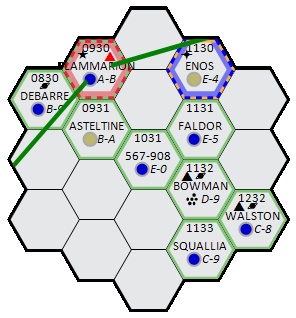
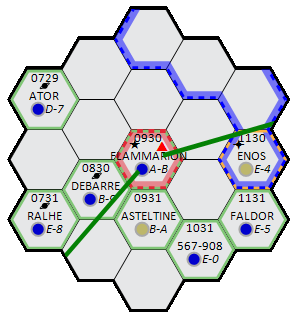
A map of the local jump map around Flammarion

After receiving a message from Earl Dumarest regarding a job offer, we all gather and meet in High-port, one of Flammarion Spaceport bars to get reacquainted and to share our experiences whilst we were separated. There is a Scout Way-station attached to the Spaceport, there is a Naval Base which is separate from the Spaceport. X-boats also stop on Flammarion.

We decide to make a party of our get together before meeting with Anders Ascaris the next day.

Engineering Brochure view of the Type K Safari Ship

We are shown into Anders office and welcomed, whom seems to be talking exclusively to Earl in the interim. He/we are offered something called detached duty working for the Scout Service but are informed that currently there are no ships available, but an alternative is being offered. It is a converted Safari ship Type K Safari Ship, jump 2 capability, military grade sensors, 11 staterooms. The only small issue is that the ship is not on Flammarion, but on Walston, a jump 4 away from our current planet. Transport on a subsidised liner has been arranged for all of us. Another problem is that the previous crew abandoned the ship due to being brought up on charges of defrauding the Scout Service by taking the spare parts they were providing and selling them for profit and then buying inferior replacement electronics and spare parts which led to it failing an inspection at Walston leading to the abandonment. The electronics on the ship are in poor condition, but the Scout Service will replace the electronics and any other parts that need to be replaced, and any other faults will be repaired.

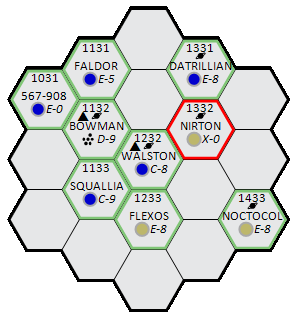
Walston is a Tech level 8 planet with a C Class Spaceport, a Scout Base Warehouse, Walston does not however have the parts we need to make the necessary repairs.

Our Tickets for the Liner will allow us to jump to 567-908 E-O where refuelling will take place, and then onto Walston, where we will collect the Vagabond's Hope (the name of our ship).

Earl accepted the contract on behalf of all of us, rules of engagement are we can return fire if we are first fired upon, in the case of hijacking and piracy, we can initiate combat, Masuyo has a full recording of our conversation with Anders.

A view of a modified Type K Safari ship

Modified Type K Safari Ship in flight

Contract terms for detached duty

First published 1st January 2025 (Last Modified 5th May 2025)

Imperial Scout Service Detached Duty Terms and Conditions

Standard Terms

Article 1: Purpose The purpose of this agreement is to outline the terms and conditions under which a scout, hereafter referred to as the “Scout,” will operate a designated Imperial Scout Service vessel (hereafter referred to as the “Ship”) during their detached duty.

Article 2: Ship Allocation The Imperial Scout Service shall allocate the Ship to the Scout for the duration of their detached duty. The Scout is responsible for the Ship’s maintenance, upkeep, and overall condition.

Article 3: Mission Objectives The Scout shall complete any mission objectives assigned by the Imperial Scout Service, which may include:

  • Exploring uncharted regions of space
  • Charting new worlds or celestial bodies
  • Conducting surveys on planetary conditions
  • Providing intelligence reports to Imperial Scout Service HQ

Article 4: Communication and Reporting The Scout shall maintain regular communication with Imperial Scout Service using the Ship’s communication systems. The Scout shall submit regular mission reports, including findings, discoveries, and any notable events whenever visiting a system with an Imperial Scout Station.

Article 5: Safety Protocols The Scout is responsible for ensuring the safety of themselves, their crew (if applicable), and any third-party personnel on board the Ship. The Scout shall adhere to all standard Imperial Scout Service safety protocols and guidelines.

Article 6: Equipment Maintenance The Scout shall perform routine maintenance and inspections on the Ship’s equipment, including but not limited to:

  • Life support systems
  • Propulsion systems
  • Communication arrays
  • Sensors and scanners

The Imperial Scout Service will provide funding for annual inspection and servicing of the Ship and its equipment.

Article 7: Unauthorized Activities The Scout is prohibited from engaging in any unauthorized activities while operating the Ship, including but not limited to:

  • Commercial trade or commerce that requires the Ship to be at a specific location at any time or requires the Ship to perform any specific task
  • Military operations or combat
  • Illegal activities or espionage

Authorization must be obtained in writing from the Imperial Scout Service before the activity occurs. However, in the event that the ship is engaged in combat that it did not initiate the ship and its crew are authorized to act in self defence.

Article 8: Liability In the event of any damage or loss sustained by the Ship during the Scout’s detached duty, the Scout shall be held liable for the costs of repairs and/or replacement. This liability may be waived by the Imperial Scout Service at its discretion.

Article 9: Annual InspectionThe Ship must undergo an annual inspection and overhaul at least once in each calendar year

Article 10: Termination This agreement may be terminated at any time by the Imperial Scout Service, should the Scout fail to comply with the terms and conditions outlined herein or in the event of the vessel being required for other duties. In such cases, the Scout shall immediately return the Ship to the nearest Imperial Scout Base on being informed of the termination of the agreement.

Article 11: Effective Date This contract becomes effective upon allocation of the Ship to the Scout and remains in effect until terminated or superseded by subsequent agreement.

Supplemental Terms

Article S.1: The Scout is Earl Dumarest

Article S.2: The Ship is the Vagabond's Hope, a modified Type K Safari Ship currently at Walston.

Article S.3: The Scout will be supplied with Middle Passge tickets for transport of up to 8 people from Flammarion to Walston. In addition to the Middle Passage Ticket an allowance of Cr1,000 per person will be provided to cover all incidental expenses.

Article S.4: The Scout will be supplied with equipment and software that will allow the Scout to take possession of the Ship and bring to Flammarion.

Article S.5: The Scout will be supplied with Scout Service Refuelling Vouchers that can be redeemed at the Bowman and Asteltine Starports.

Article S.6: Once the Ship is brought to Flammarion, the Scout Service will provide Accommodation and Cr1,000 per person while the Ship undergoes a Full Systems Overhaul.

Article S.7: The Ship may be involved in commercial activities, as long as these do not conflict with the Scout Service

Article S.8: If the ship is hijacked the Scout is permitted to inititate combat to retrieve the Ship.

Article S.9: The Scout is allocated the ship on 120-1105

Character Back Histories

First published 18th November 2024 (Last Modified 8th April 2025)

Timeline of character histories

YearChase StormburgCyndarielEarl DumarestFioranaJunebugMasuyo RyujinTharbin
1059Born
1061
1063Born
1065
1067Born
1069
1071BornBorn
1073
1075Born
1077Entered Naval Academy
1079BornJoined a clique
1081Joined NavyBecame a Dilettante Noble
1083Notable Military engagement
1085Attended UniversityBecame a Merchant as a brokerAppointed as an adminstrator
1087Joined a cliqueStruck a good dealFamily Scandal
1089Became a scoutEntered Naval AcademyJoined the MarinesPromoted
1091Exemplary serviceJoined a cliqueStruck another good deal
1093Joined the ScoutsJoined NavyAbandoned Post
1095Discovered a new planetShip ambushed by enemy agentsRomantic RelationshipTook part in a planetary assault
1097Joined the ScoutsPromoted to SublieutenantPromotedReappointed to role as adminstrator as a Manager
1099Discovered new planetRomantic RelationshipTravelling in the service of the scoutsCommanding Officer took an interest in careerRomantic RelationshipStruck yet another good dealGained an inheritance
1101Promoted to LieutenantPromoted (and retained by the marines for another term)Promoted to Manager
1103Caused a conflictCaused a conflictExplemary service for scoutsTook part in a naval engagementPromoted to SergeantAdvanced TrainingInvolved in Politics
1105Entered CampaignEntered CampaignEntered CampaignEntered CampaignEntered CampaignEntered CampaignEntered Campaign

Events in the most recent term

During 1102 Chase and Cyndariel were, as part of their scout duties, assigned to a mission to a systems just beyond the edge of the Third Imperium. One of worlds visited was Gollere (Egyrn 0505), a regressed settlement which was well on its way to recovering space travel (it is at TL 7). During the visit some starships from a nearby system, Belgard. arrived to trade for agricultural supplies. The Belgardians are xenophobic, particularly when it comes to other starfarers and Chase and Cyndariel managed to raise the hackles of the Belgardian (mainly by boasting about their past discoveries in the Egryn subsector).

The Belgardians responded by launching a full scale invasion of Gollere and kidnapping both Chase and Cyndariel.

The Imperial Scout Service doesn't take kindly to this (particularly as both Chase and Cyndariel are serving members of the Scout Service with excellent service records) and organises a counter invasion to both return the inhabitants of Gollere to their previous government (a collaboration between specialised clans) and to free Chase and Cyndariel.

Since the scout don't have significant military forces of their own, a significant military operation is required, partially organised by Tharbin (safely back in the Spinward Marches). The naval assets included the hiring of the Leviathan Class Merchant Cruiser Nicholas de Nicolay who crew complement included Masuyi who was able to earn the cruiser significant additional funds as it travelled to Gollere.

Since this is a military operation several naval and marine personnel was seconded to crew of the Nicholas de Nicolay including Earl Dumarest (of the scouts and acting as the main liaison between the scouts, the navy and the marines), Fiorana of the Navy and assigned as the lieutenant in charge of the Armament of the Nicolas de Nicolay and Junebug as a corporal in the Marine section assigned to the rescue operation.

The rescue operation was a great success with Fiorana in particular gaining the Navy Lifesaving Medal for rescuing the gunners under her command when the Nicolas de Nicolay was rammed by a Belgardian escort vessel (its pilot having lost control during an attempt to deliver a close range broadside to the Nicolas de Nicolay).

On the ground Junebug took over leading the rescue operation when her sergeant was incapacited during the assault. Her actions resulted in her promotion to Sergeant.

Earl's success in managing to keep the tensions between the merchant owners of the Nicolas de Nicolay, the naval officers in charge of the naval personnel, the marine commander and his superiors in the Scout Service (who were funding the operation) was recognised by the Scout Service after the completion of the mission.

At the end of the term it is 'suggested' to Chase and Cyndariel that maybe they could better progress their lifes outside of the Scout Service!


Change History
19th November 2024
Add events in the most recent term and even out the columns in the table

Mongoose Traveller V2 Character Creator Plugin Details

First published 6th October 2024 (Last Modified 25th December 2024)

Description

This plugin adds a shortcode to add a sandpit for character creation experimentation. This allows for a new character to be created. The characters are saved locally in the browser (only) and can be exported in a format importable into Fantasy Grounds Unity.
[mongooseTravellerV2CharacterCreator /]

The following (minor) rules interpretations, clarifications and modifications have been made by this plugin:

  • Three of the initial stat rolls are made with a boon (i.e., roll 3D6 and take the best two).
  • Mishap 2 is always severely injured.
  • Skill specialisations are chosen at the end of character creation (rather than as you acquire level one in the base skill). This was to avoid overwhelming the player with options. However that does mean where you should be awarded a specialisation in a skill you, initially, get a level in the base skill instead. Also those skills which can be specialised are allowed to go above four until you reach that specialisation step.
  • In a few places where the official rules allow you to choose a skill in the skill tables these has been replaced by providing an entry for each skill in that table (making it have seven rows and a 1D7 roll).
  • The 'Any talent' entry in the Psion service skill table has been omitted (making that table have five rows and hence a 1D5 roll).
  • Connections do not allow the choice of any psionic talent (unless the character is Zhodani).
  • Version: 3.331.0
  • Author: David Vines
  • Last Updated: 2025-12-09T11:26:42Z
  • Requires WordPress Version: 4.0 or higher
  • Tested up to: 6.9
  • License: Contains materials from Mongoose which are used by following the Mongoose fair use policy. The code elements were written solely by myself.

    The Traveller game in all forms is owned by Mongoose Publishing. Copyright 1977 - 2024 Mongoose Publishing. Traveller is a registered trademark of Mongoose Publishing. Mongoose Publishing permits web sites and fanzines for this game, provided it contains this notice, that Mongoose Publishing is notified, and subject to a withdrawal of permission on 90 days notice. The contents of this site are for personal, non-commercial use only. Any use of Mongoose Publishing’s copyrighted material or trademarks anywhere on this web site and its files should not be viewed as a challenge to those copyrights or trademarks. In addition, any program/articles/files on this site cannot be republished or distributed without the consent of the author who contributed it.

    The images were generated using Microsoft's copilot AI Image generator. As such Microsoft, its affiliated companies and third-party partners are granted permission to use the Prompts, Creations, customisations (including GPTs) and related content in connection with the operation of its businesses (including, without limitation, all Microsoft Services), including, without limitation, the licence rights to: copy, distribute, transmit, publicly display, publicly perform, reproduce, edit, translate and reformat the Prompts, Creations and other content that were provided to create the image; and the right to sublicense such rights to any supplier of the Online Services.

    In particular note that this page explicitly does not grant consent to republish or distribute this plugin.

Change Log

3.331.0 - 09 December 2025

Add combat skills to capsule description (if not already listed)

3.330.0 - 08 December 2025

Add name and a description of some characteristics to the capsule description

3.329.0 - 07 December 2025

  • Provide a preference between Drive and Flyer. Some skill tables have an entry 'Drive or Flyer' - Rather than ask the player when the skill is rolled, we instead ask for a preference in the homeworld section (defaulting to Drive for worlds of TL8 or lower and Flyer for worlds of TL9 and higher). We ask in the homeworld section to avoid asking when granting the skill since it's hard for the code to ask for that choice when granting the skill
  • Provide a capsule description (suitable for use as a prompt to an AI image generator)
  • Bug fix: No way to proceed after winning a prison fight

3.328.0 - 27 November 2025

Cope with members of a psionic community who don't gain any psionic talents

3.327.0 - 01 November 2025

Bug fix: Being forced to leave a career lingers to all following career. Also stop forcing drifters to leave their career (you should always be able to become a drifter)

3.326.0 - 29 October 2025

Hide the text saying that you didn't get a psionic talent during training as well as elsewhere

3.325.0 - 11 October 2025

Fix link to the version history in the copyright notice

3.324.0 - 11 October 2025

Refactor: Common up some code between my plugins

3.323.0 - 06 October 2025

Bug Fix: Correct lookup for prisoner event 3

3.322.0 - 02 October 2025

Bug fix: drifter event 9 rejected text missing

3.321.0 - 01 October 2025

Sigh - Bug fix, correct the broken text for prisoner. Also fix skipping the psionic test (life event 12.1)

3.320.0 - 01 October 2025

Prevent exception on bad character load, Improve text for prisoners

3.319.0 - 13 September 2025

Bug fix: citizen mishap 4 missing text

3.314.0 - 10 September 2025

Add retrieve button to homeworld page

3.311.0 - 07 September 2025

Fix regular expression used to validate UWP

3.310.0 - 01 September 2025

Bug fixes:

  • Exception after choosing connections if you have psionic skills
  • Exception gaining fourth level of a psionic skill
  • Dice roll for psionic community hidden
  • GM Mode always ticked after page reload

3.309.0 - 31 August 2025

(Hopefully) fix generated PDF so that it is readable in Adobe Acrobat

3.308.0 - 30 August 2025

Bug fix: Exception 'no active control' when winning the duel in noble event 3

3.307.0 - 30 August 2025

Bug fix: Exception when processing end of term for characters who have the School of Hard Knocks precareer. Correct spelling of 'Streeetwise'

Show hidden stats in GM Mode

3.306.0 - 29 August 2025

Bug fix: exception on a failed aging roll

3.305.0 - 29 August 2025

Accept UWP copy/pasted from travellermap.com, fix handling of anagathics when aging

3.304.0 - 29 August 2025

Add a stats reroll if in GM mode

3.303.0 - 29 August 2025

Add GM (aka Cheat) Mode, save initial decisions in session storage (so it persists over a page reload)

Add Chronor as the default homeworld for Zhodani characters and Saurus as the default for Saurian characters

3.302.0 - 29 August 2025

Correct enlistment criteria for university and militray academies (too generous by one and two points respectively)

Also fix survival and advancement rolls that are based on END (this characteristic was being ignored)

3.301.0 - 28 August 2025

Reenable and fix the 'no active control' check

3.300.0 - 28 August 2025

Change the 'no active control' check from an exception into a console.log

3.299.0 - 28 August 2025

Add precareer options from Traveller Companion

3.298.0 - 28 August 2025

Bug fix: Sigh - fix awarding of TAS Membership (and fix description of Vargr stat changes)

3.297.0 - 28 August 2025

Bug fixes: Unknown Benefit Award: END +1, exception when generating PDF and character is a member of TAS.

3.296.0 - 28 August 2025

Bug fix: Exception if only one choice of specialisation

3.295.0 - 27 August 2025

Bug fix: scout event 10 failing with no element with id

3.294.0 - 26 August 2025

Bug fix: prevent negative total of benefit rolls, correct prisoner event handling

3.293.0 - 22 August 2025

Add additional races

3.292.0 - 21 August 2025

Fix unable to proceed after choosing the skill for scholar event 8

3.291.0 - 15 August 2025

Fix some promotion bonuses

3.290.0 - 15 August 2025

Bug fix - javascript error when you get promoted with a bonus!

3.289.0 - 15 August 2025

Add benefit roll on promotion even if you don't get any other bonus

3.288.0 - 03 August 2025

Bug fix - javascript error for citizen mishap 4

3.285.0 - 19 May 2025

Bug fix - javascript error when gaining advanced training

3.283.0 - 16 May 2025

Bug fix - javascript error for some agent events

3.282.0 - 12 May 2025

Add ability to choose how many characterestics are rolled with boon

3.279.0 - 25 December 2024

Fix to FGU export xml file (cosmetic fix)

3.278.0 - 18 November 2024

Bug fix - Adjust scout mishap3's contact and enemy counts. Provide enemy text on Scout event 3, Fix Typo's, Stop several events overwriting career event

3.277.0 - 18 November 2024

Fix typo. Add full life event list to the Notes of the FGU export

3.276.0 - 15 November 2024

Lock skills in the FGU file, Wording fixes, Bug fixes (citizen mishap4 and event3)

3.275.0 - 10 November 2024

Typo and small bug fixes. Rework the display of advancement options

3.274.0 - 08 November 2024

Added ability to embed text in the initial page (between the notes and the copyright notice)

3.273.0 - 08 November 2024

PDF Generation added

3.272.0 - 03 November 2024

Add Psionics

3.271.0 - 30 October 2024

Bug fixes

3.270.0 - 28 October 2024

Reword mishaps and events so that mishaps caused by events do not imply you leave the career is almost all cases. Add Anagathics

3.269.0 - 25 October 2024

Allow medical bills for injuries

3.268.0 - 25 October 2024

Add save and view options, add a free format field

3.267.0 - 24 October 2024

Fix multiple specialisations!

3.266.0 - 21 October 2024

Allow for multiple specialisations

3.265.0 - 18 October 2024

Added the remaining careers (apart from Psion) and the draft

3.264.0 - 12 October 2024

Add the army career

3.263.0 - 06 October 2024

Bug fixes

3.262.0 - 06 October 2024

Add more careers

3.261.0 - 27 September 2024

Add mustering out, export of characters, bug fixes

3.259.0 - 23 September 2024

Initial Version - pre-alpha (no mustering out, connections, end of character or export. Only pre-careers and rogues implements so far


The information on this page was retrieved by Plugin Information Version 3.282.0.

Setup for joining us on Fantasy Grounds

First published 3rd September 2024

We use a couple of bits of software to allow us to play roleplaying via a virtual tabletop:


Discord

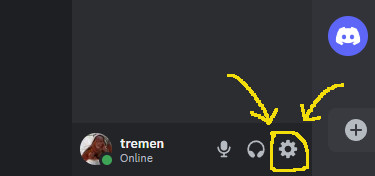
A partial screen capture of the main discord app with the icon for User Settingshighlighted

The location of the settings icon

To allow voice communication we use discord. The desktop version can be downloaded for free from here. You do not need to pay anything to download, setup and use discord1. Once installed and you've registered yourself as a user contact myself or Neil to get an invite to what Discord calls our "server" (a collection of text, voice and even video channels).
There are a few settings we require and/or recommend. You can get to the settings page via the cog icon at the bottom left hand corner of discord's window:

A view of the discord voice & video settings

My Voice & video settings

Once there select Voice & Video and check (and if necessary change) the following settings (note you can click on the image to see at full size):

INPUT DEVICE
Which microphone do you want to use. If you have only one microphone you can probably leave this at the default2.
OUTPUT DEVICE
Which speakers do you want to use. If you have only one of set of speakers you can probably leave this at the default. If, however, you have both a set of speakers AND a headset you need to either change the default in Windows to send sound to your headset or choose which one discord should use here3.
INPUT VOLUME
Leave at the default of 100% unless everyone complains you're too loud. If you find someone else is too loud you can adjust just their volume as explained below.
OUTPUT VOLUME
If you're finding everyone else is too loud or too quiet you can change the global volume here.
INPUT MODE
Select Push-to-talk4.
SHORTCUT
Choose which key to press when you want to speak. I use the left control button on the keyboard5 but Neil uses one of his mouse buttons, You can choose almost any key for this.
PUSH-TO-TALK RELEASE DELAY
Move the slider to increase the time between when you release the push-to-talk key and the time your microphone becomes muted. Note that the default is 0 milliseconds and typically your fingers are ahead of your mouth and hence your final word gets either cut in half or muted completely. Mine is set to around 500ms which seems to work.

There's also a section of settings for Notifications that includes a PTT Activate and a PTT Deactivate notification sounds. Note, however, that the notification sounds are NOT sent to the output device you chose in Voice & Video but just sent as audio to windows. So if your default windows output device are your speakers you'll need to go to your windows settings6, select System then Sound followed by App volume and device preferences and then, With the discord app running, manually choose the devices to be used for sound for the Discord application7.

If you find that one person's voice is too loud or too quiet you can manually how loud they are by right-clicking their name in the voice chat channel and then moving the slider to increase or decrease their individual volume.

Discord will check if it needs updates as part of its startup process and will do an update if necessary

There are also mobile versions of the application for both Android and Apple available in their respective app stores. I do not recommend using a mobile for voice8 but I do recommend it as a way of seeing (and getting notifications about) the text channels.

I strongly recommend going through the setup for discord well before the first game session since, inevitably, it takes a while to get the setup working exactly the way you want it to9


Fantasy Grounds Unity main page screenshot

Fantasy Grounds Unity main page

Fantasy Grounds Unity

You'll be glad to learn that there's less setup needed for Fantasy Grounds Unity. You can download it from their home page. You only need the Free Demo vesrion since both myself and Neil have Ultimate Licenses which allow us to host games for those with the free demo versiom. If you ever wanted to run a game you'd need to get the ultimate version since we have players with only the free demo version.

The free demo version has, for players, all the features of the core license or ultimate versions.

When the time comes we will lead you through how to join a game10. I do recommend that before every game session you fire up Fantasy Grounds Unity and look to see if it needs any updates. Our game sessions are widely enough spread out that there's usually some updates that have been made between our game sessions.


Footnotes

  1. Discord does have a premium currency called Nitro to allow the purchase of additional features. We've not found the need to purchase anything.
  2. I do have two microphones potentially connected so I do set the device here.
  3. Similarly I do have both speakers and a headset so have to set the output device.
  4. This keeps the channel quiet except when someone wants to talk and hence avoids unneccessary distractions.
  5. Note that when I press the left control key to push-to-talk it still acts as a control key so I do have to be aware of that should I try to use any other key (for example to do something in Fantasy Grounds Unity).
  6. These instructions assume you're using Windows 10.
  7. Note that this is a real pain since whenever discord updates its main application the windows settings treats it as a new application and you'll have to go in and change these settings again - I haven't found a better way to do this so far.
  8. It does work but getting push-to-talk to work is not as straightforward.
  9. Don't get me wrong, it is good software but as seen above it can require a fair bit of setting up to get everything the way you want it to be.
  10. Assuming, of course, you have successfully set up Discord and joined the voice chat channel.